At almost every appointment, your doctor asks how many days you had a headache last month. From memory, you guess. Counting headache days takes entries, and since version 1.16.0 PainTrack has a headache days per month tracker built in: the “Pain days per month” card on the Analysis page.
The card counts your pain days and attacks for each calendar month and, with Pro, the days you took acute medication. Add an event such as starting a treatment to see the change since. The same figures go into the doctor's report. For what else to note on a headache day, see Keeping a migraine and headache diary.
Why doctors ask about days per month
With headache and migraine, doctors usually track progress in headache days per month and judge a preventive treatment mainly by whether that number falls over several months. You rarely get it right from memory: one bad day sticks, ten moderate ones blur together. At the appointment you need three figures:
- Pain days: on how many days of the month it hurt.
- Attacks: how many episodes there were. A three-day attack differs from three separate headache days.
- Days with acute medication: on how many days you took a painkiller or migraine medication. Frequent use can itself make headaches worse, see Medication overuse headache.
How PainTrack counts
| Term | What counts |
|---|---|
| Pain day | a day with at least one entry above 0, or “yes” on a yes/no scale |
| Attack | consecutive days at or above the intensity you set for each pain; it counts in the month it starts |
| Day with acute medication (Pro) | a day with at least one dose of an “As needed” medication |
| Day without an entry | not counted |
With several pains, a day counts once as a pain day, even with migraine and neck pain on the same day, and attacks add up across the selected pains. Once you have two pains, you choose which ones count with the pain selector at the top of Analysis.
Because only documented days count, log pain-free days too; the quickest way is “No pain today” in the daily reminder. Only then does a low number mean few pain days and no gaps in your diary. For tips on keeping it up, read How to keep a pain diary.
The card step by step
- Open Analysis. By default, the “Pain days per month” card sits right below the Weekly trend.
- Pick the “Pain days” or “Attacks” tab at the top. Once you have an “As needed” medication, “Acute meds” appears too.
- Read the bars for the last six months, each with its number on top. The current month is marked “so far”.
- With an event, a line above the bars shows -25% since “Started therapy” (avg 8 → 6 per 30 days).
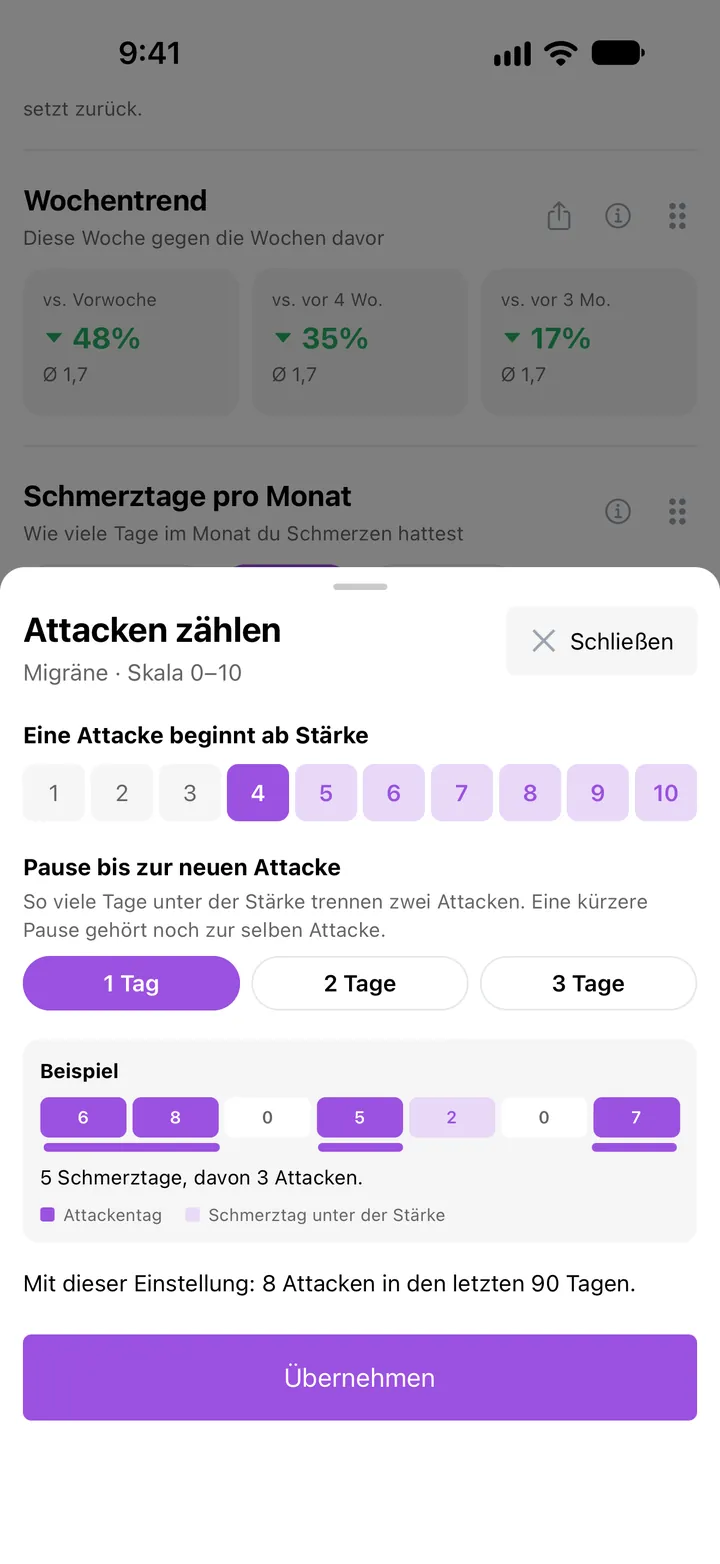
- Tap “What counts as an attack?” below the bars to set how your pain is counted.
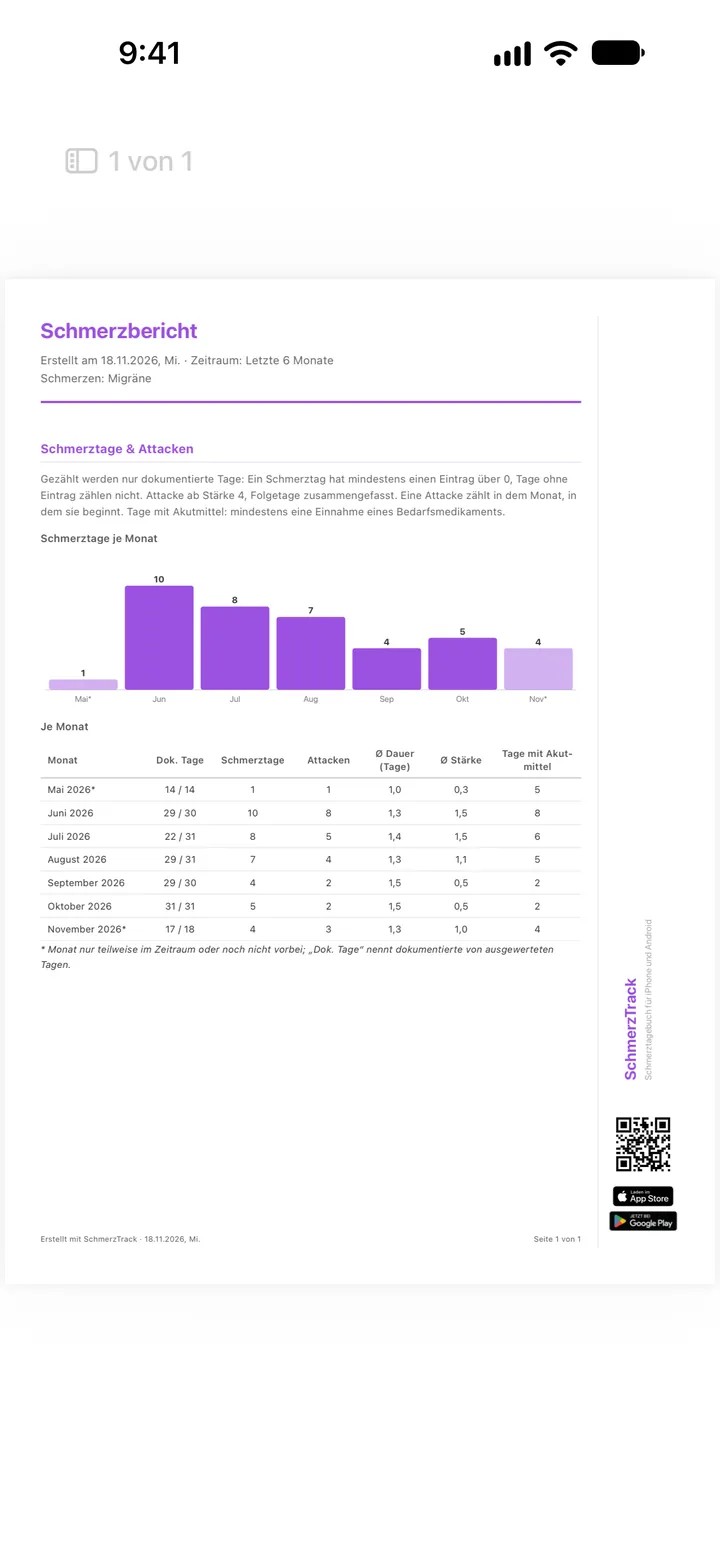
- For your appointment, tap “Report” in the “Doctor's report” block at the bottom of Analysis. “Pain days & attacks” is preselected.
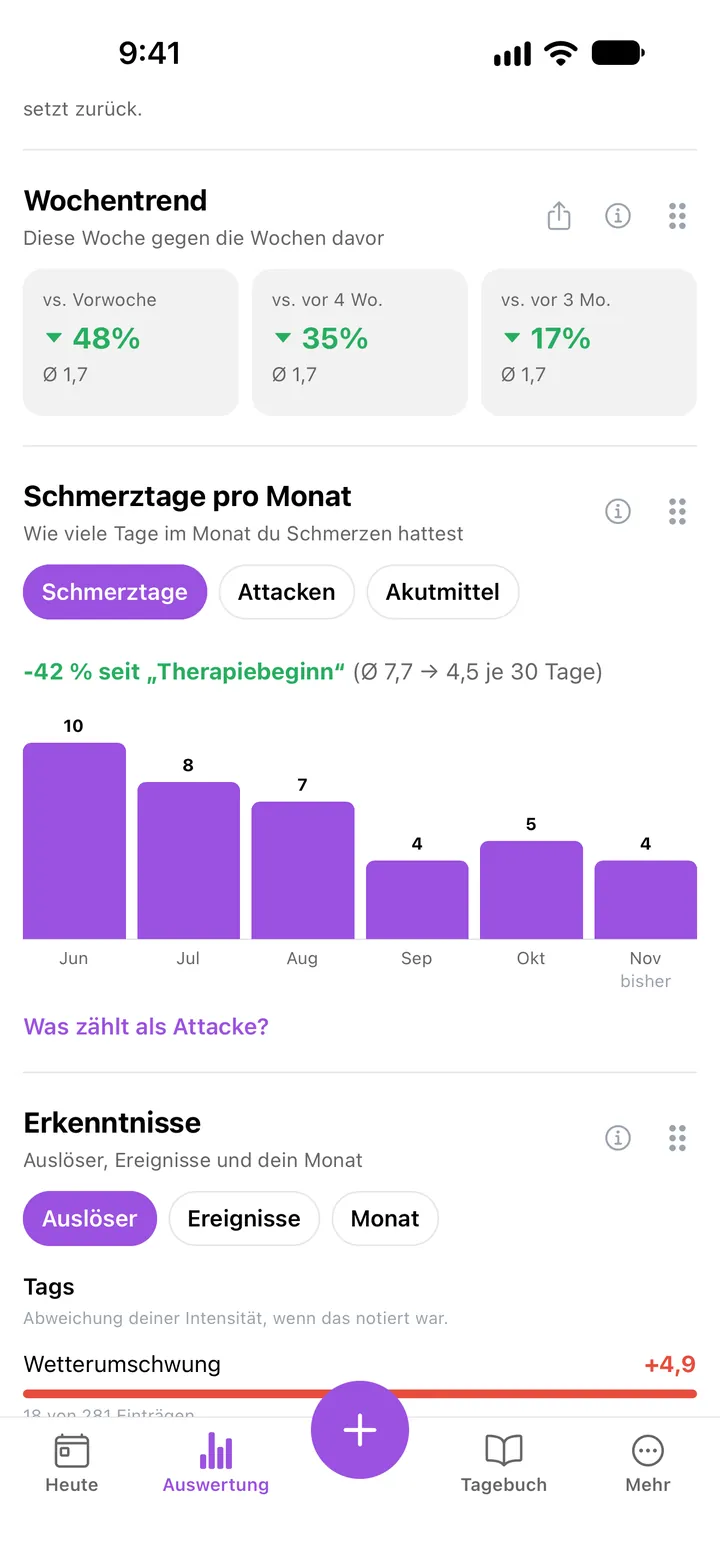
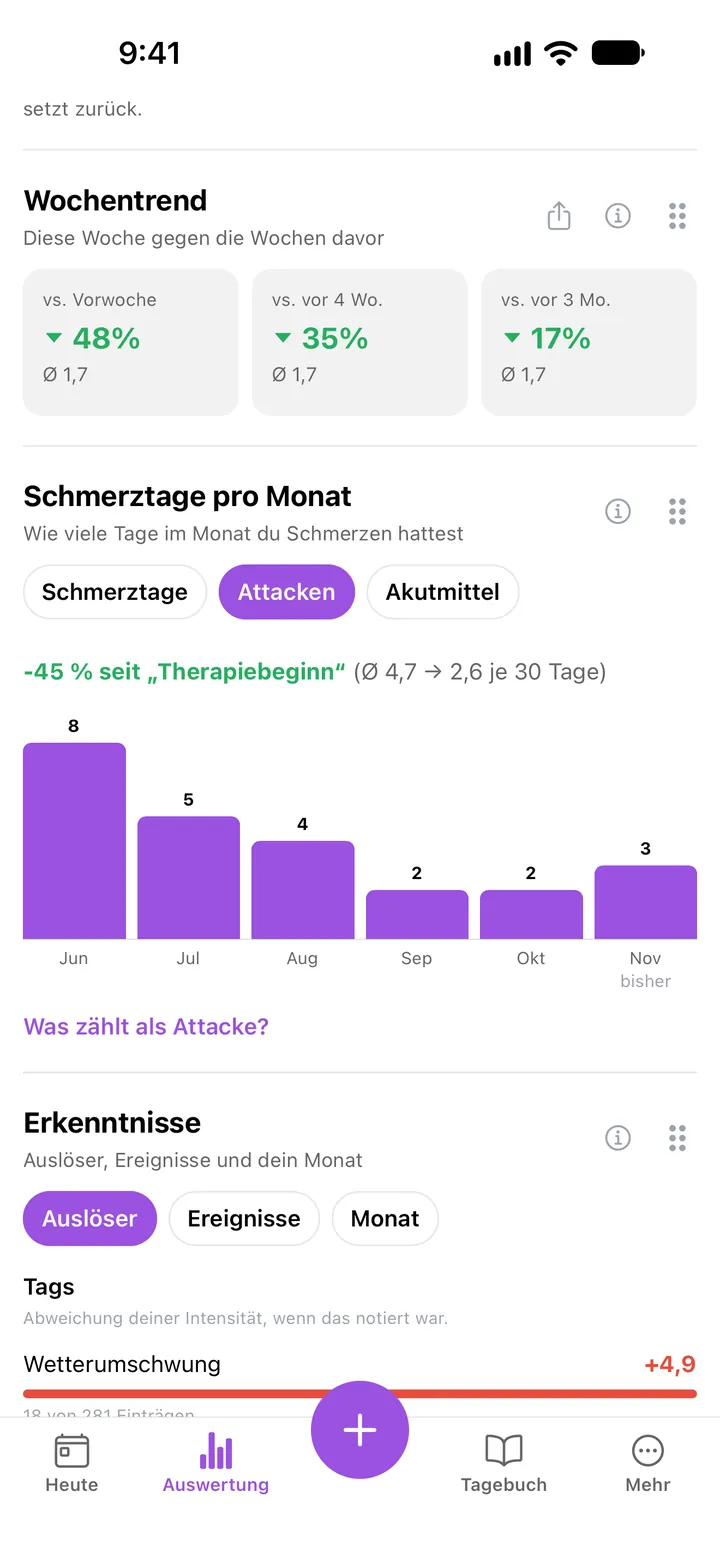
The line compares the time before your latest event with the time since. Both are scaled to 30 calendar days, so a month in progress looks no better than it is. Each period needs at least 14 days, and at most 180 days before the event go in. You add events under More → Events. If you log less often after the event, the number drops even without improvement.
Setting intensity and break: “What counts as an attack?”
You decide per pain what an attack is. Open the “Counting attacks” sheet with “What counts as an attack?” on the card, or in the pain's edit dialog under More → Pains. It has two settings:
- An attack starts at intensity: 4 by default on the 0 to 10 scale, the middle level on mild/moderate/severe, and every “yes” day on yes/no.
- Break before a new attack: you pick 1, 2 or 3 days. That many days below the intensity separate two attacks; a shorter break still belongs to the same attack.
Say you log 6, 7, 2 and 5 from Monday to Thursday. With the default (from 4, 1-day break), PainTrack counts two attacks: Monday to Tuesday, and Thursday. With a 2-day break, the app bridges Wednesday and one attack remains. Either way, that is four pain days.
An example week and a preview of your last 90 days show the effect before you tap “Apply”. The setting is free. Set it once and rarely change it, so your months stay comparable.
Acute meds and the doctor's report
The “Acute meds” tab (Pro) counts days with at least one dose of an “As needed” medication. It appears once you have added one. Without Pro, you see its numbers blurred.
The “Pain days & attacks” section of the PDF doctor's report is free. At the top are the counting rules, including your attack intensity. Below them come a bar chart of pain days per month and a table with documented days, pain days, attacks, and average duration and intensity. With as-needed medications, a column for days with acute medication is added; partial months carry an asterisk. From the documented days, your doctor can see how complete your records are.
Pro adds the “Calendar” section: a Monday to Sunday grid for each month, every day coloured by its highest value, with a dot for days with acute medication. Copy the report with “Copy for AI chat” and the text includes the monthly table and counting rules. For the whole report, see PDF doctor's report.
Free and Pro at a glance
| Feature | Free | Pro |
|---|---|---|
| Pain days, attacks and event comparison | last 90 days, older months locked | full history |
| “Acute meds” tab | blurred | yes |
| “What counts as an attack?” | yes | yes |
| Doctor's report: “Pain days & attacks” | yes, periods up to 3 months | yes, all periods |
| Doctor's report: “Calendar” | locked | yes |
For the last three months you don't need a subscription.
Frequently asked questions
What counts as a headache day? In PainTrack, any day with at least one entry above 0, or “yes” on a yes/no scale. Days without an entry are not counted, and with several pains a day counts once.
Is the Pain days per month card free? Yes, for the last 90 days, including attacks and “What counts as an attack?”. Pro shows your full history and the days with acute medication.
How do I show my headache days to my doctor? Through the PDF doctor's report with its “Pain days & attacks” section, free for up to three months. With Pro you choose longer periods and can add the calendar.
PainTrack is not a medical device and does not replace medical diagnosis or treatment. The app is intended for personal documentation and self-observation.